Prompt Management
Run experiments or change the specific model (e.g. from gpt-4o to gpt4o-mini finetune) from your prompt management tool (e.g. Langfuse) instead of making changes in the application.
| Supported Integrations | Link |
|---|---|
| Native LiteLLM GitOps (.prompt files) | Get Started |
| Langfuse | Get Started |
| Humanloop | Get Started |
Onboarding Prompts via config.yaml
You can onboard and initialize prompts directly in your config.yaml file. This allows you to:
- Load prompts at proxy startup
- Manage prompts as code alongside your proxy configuration
- Use any supported prompt integration (dotprompt, Langfuse, BitBucket, GitLab, custom)
Basic Structure
Add a prompts field to your config.yaml:
model_list:
  - model_name: gpt-4
    litellm_params:
      model: openai/gpt-4
      api_key: os.environ/OPENAI_API_KEY

prompts:
  - prompt_id: "my_prompt_id"
    litellm_params:
      prompt_id: "my_prompt_id"
      prompt_integration: "dotprompt"  # or langfuse, bitbucket, gitlab, custom
      # integration-specific parameters below
Understanding prompt_integration
The prompt_integration field determines where and how prompts are loaded:
dotprompt: Load from local.promptfiles or inline contentlangfuse: Fetch prompts from Langfuse prompt managementbitbucket: Load from BitBucket repository.promptfiles (team-based access control)gitlab: Load from GitLab repository.promptfiles (team-based access control)custom: Use your own custom prompt management implementation
Each integration has its own configuration parameters and access control mechanisms.
Supported Integrations
- DotPrompt (File-based)
- Langfuse
- BitBucket
- GitLab
Option 1: Using a prompt directory
prompts:
  - prompt_id: "hello"
    litellm_params:
      prompt_id: "hello"
      prompt_integration: "dotprompt"
      prompt_directory: "./prompts"  # Directory containing .prompt files

litellm_settings:
  global_prompt_directory: "./prompts"  # Global setting for all dotprompt integrations
Option 2: Using inline prompt data
prompts:
  - prompt_id: "my_inline_prompt"
    litellm_params:
      prompt_id: "my_inline_prompt"
      prompt_integration: "dotprompt"
      prompt_data:
        my_inline_prompt:
          content: "Hello {{name}}! How can I help you with {{topic}}?"
          metadata:
            model: "gpt-4"
            temperature: 0.7
            max_tokens: 150
Option 3: Using dotprompt_content for single prompts
prompts:
  - prompt_id: "simple_prompt"
    litellm_params:
      prompt_id: "simple_prompt"
      prompt_integration: "dotprompt"
      dotprompt_content: |
        ---
        model: gpt-4
        temperature: 0.7
        ---
        System: You are a helpful assistant.

        User: {{user_message}}
Create .prompt files in your prompt directory:
# prompts/hello.prompt
---
model: gpt-4
temperature: 0.7
---
System: You are a helpful assistant.

User: {{user_message}}
prompts:
  - prompt_id: "my_langfuse_prompt"
    litellm_params:
      prompt_id: "my_langfuse_prompt"
      prompt_integration: "langfuse"
      langfuse_public_key: "os.environ/LANGFUSE_PUBLIC_KEY"
      langfuse_secret_key: "os.environ/LANGFUSE_SECRET_KEY"
      langfuse_host: "https://cloud.langfuse.com"  # optional

litellm_settings:
  langfuse_public_key: "os.environ/LANGFUSE_PUBLIC_KEY"  # Global setting
  langfuse_secret_key: "os.environ/LANGFUSE_SECRET_KEY"  # Global setting
prompts:
  - prompt_id: "my_bitbucket_prompt"
    litellm_params:
      prompt_id: "my_bitbucket_prompt"
      prompt_integration: "bitbucket"
      bitbucket_workspace: "your-workspace"
      bitbucket_repository: "your-repo"
      bitbucket_access_token: "os.environ/BITBUCKET_ACCESS_TOKEN"
      bitbucket_branch: "main"  # optional, defaults to main

litellm_settings:
  global_bitbucket_config:
    workspace: "your-workspace"
    repository: "your-repo"
    access_token: "os.environ/BITBUCKET_ACCESS_TOKEN"
    branch: "main"
Your BitBucket repository should contain .prompt files:
# prompts/my_bitbucket_prompt.prompt
---
model: gpt-4
temperature: 0.7
---
System: You are a helpful assistant.

User: {{user_message}}
prompts:
  - prompt_id: "my_gitlab_prompt"
    litellm_params:
      prompt_id: "my_gitlab_prompt"
      prompt_integration: "gitlab"
      gitlab_project: "group/sub/repo"
      gitlab_access_token: "os.environ/GITLAB_ACCESS_TOKEN"
      gitlab_branch: "main"  # optional
      gitlab_prompts_path: "prompts"  # optional, defaults to root

litellm_settings:
  global_gitlab_config:
    project: "group/sub/repo"
    access_token: "os.environ/GITLAB_ACCESS_TOKEN"
    branch: "main"
Your GitLab repository should contain .prompt files:
# prompts/my_gitlab_prompt.prompt
---
model: gpt-4
temperature: 0.7
---
System: You are a helpful assistant.

User: {{user_message}}
Complete Example
Here's a complete example showing multiple prompts with different integrations:
model_list:
  - model_name: gpt-4
    litellm_params:
      model: openai/gpt-4
      api_key: os.environ/OPENAI_API_KEY

prompts:
  # File-based dotprompt
  - prompt_id: "coding_assistant"
    litellm_params:
      prompt_id: "coding_assistant"
      prompt_integration: "dotprompt"
      prompt_directory: "./prompts"

  # Inline dotprompt
  - prompt_id: "simple_chat"
    litellm_params:
      prompt_id: "simple_chat"
      prompt_integration: "dotprompt"
      prompt_data:
        simple_chat:
          content: "You are a {{personality}} assistant. User: {{message}}"
          metadata:
            model: "gpt-4"
            temperature: 0.8

  # Langfuse prompt
  - prompt_id: "langfuse_chat"
    litellm_params:
      prompt_id: "langfuse_chat"
      prompt_integration: "langfuse"
      langfuse_public_key: "os.environ/LANGFUSE_PUBLIC_KEY"
      langfuse_secret_key: "os.environ/LANGFUSE_SECRET_KEY"

litellm_settings:
  global_prompt_directory: "./prompts"
How It Works
- At Startup: When the proxy starts, it reads the
promptsfield fromconfig.yaml - Initialization: Each prompt is initialized based on its
prompt_integrationtype - In-Memory Storage: Prompts are stored in the
IN_MEMORY_PROMPT_REGISTRY - Access: Use these prompts via the
/v1/chat/completionsendpoint withprompt_idin the request
Using Config-Loaded Prompts
After loading prompts via config.yaml, use them in your API requests:
curl -L -X POST 'http://0.0.0.0:4000/v1/chat/completions' \
-H 'Content-Type: application/json' \
-H 'Authorization: Bearer sk-1234' \
-d '{
    "model": "gpt-4",
    "prompt_id": "coding_assistant",
    "prompt_variables": {
        "language": "python",
        "task": "create a web scraper"
    }
}'
Prompt Schema Reference
Each prompt in the prompts list requires:
prompt_id(string, required): Unique identifier for the promptlitellm_params(object, required): Configuration for the promptprompt_id(string, required): Must match the top-level prompt_idprompt_integration(string, required): One of:dotprompt,langfuse,bitbucket,gitlab,custom- Additional integration-specific parameters (see tabs above)
prompt_info(object, optional): Metadata about the promptprompt_type(string): Defaults to"config"for config-loaded prompts
Notes
- Config-loaded prompts have
prompt_type: "config"and cannot be updated via the API - To update config prompts, modify your
config.yamland restart the proxy - For dynamic prompts that can be updated via API, use the
/promptsendpoints instead - All supported integrations work with config-loaded prompts
Quick Start
- SDK
- PROXY
import os
import litellm

os.environ["LANGFUSE_PUBLIC_KEY"] = "public_key" # [OPTIONAL] set here or in `.completion`
os.environ["LANGFUSE_SECRET_KEY"] = "secret_key" # [OPTIONAL] set here or in `.completion`

litellm.set_verbose = True # see raw request to provider

resp = litellm.completion(
    model="langfuse/gpt-3.5-turbo",
    prompt_id="test-chat-prompt",
    prompt_variables={"user_message": "this is used"}, # [OPTIONAL]
    messages=[{"role": "user", "content": "<IGNORED>"}],
)
- Setup config.yaml
model_list:
  - model_name: my-langfuse-model
    litellm_params:
      model: langfuse/openai-model
      prompt_id: "<langfuse_prompt_id>"
      api_key: os.environ/OPENAI_API_KEY
  - model_name: openai-model
    litellm_params:
      model: openai/gpt-3.5-turbo
      api_key: os.environ/OPENAI_API_KEY
- Start the proxy
litellm --config config.yaml --detailed_debug
- Test it!
- CURL
- OpenAI Python SDK
curl -L -X POST 'http://0.0.0.0:4000/v1/chat/completions' \
-H 'Content-Type: application/json' \
-H 'Authorization: Bearer sk-1234' \
-d '{
    "model": "my-langfuse-model",
    "messages": [
        {
            "role": "user",
            "content": "THIS WILL BE IGNORED"
        }
    ],
    "prompt_variables": {
        "key": "this is used"
    }
}'
import openai
client = openai.OpenAI(
    api_key="anything",
    base_url="http://0.0.0.0:4000"
)

# request sent to model set on litellm proxy, `litellm --model`
response = client.chat.completions.create(
    model="gpt-3.5-turbo",
    messages = [
        {
            "role": "user",
            "content": "this is a test request, write a short poem"
        }
    ],
    extra_body={
        "prompt_variables": { # [OPTIONAL]
            "key": "this is used"
        }
    }
)

print(response)
Expected Logs:
POST Request Sent from LiteLLM:
curl -X POST \
https://api.openai.com/v1/ \
-d '{'model': 'gpt-3.5-turbo', 'messages': <YOUR LANGFUSE PROMPT TEMPLATE>}'
How to set model
Set the model on LiteLLM
You can do langfuse/<litellm_model_name>
- SDK
- PROXY
litellm.completion(
    model="langfuse/gpt-3.5-turbo", # or `langfuse/anthropic/claude-3-5-sonnet`
    ...
)
model_list:
  - model_name: gpt-3.5-turbo
    litellm_params:
      model: langfuse/gpt-3.5-turbo # OR langfuse/anthropic/claude-3-5-sonnet
      prompt_id: <langfuse_prompt_id>
      api_key: os.environ/OPENAI_API_KEY
Set the model in Langfuse
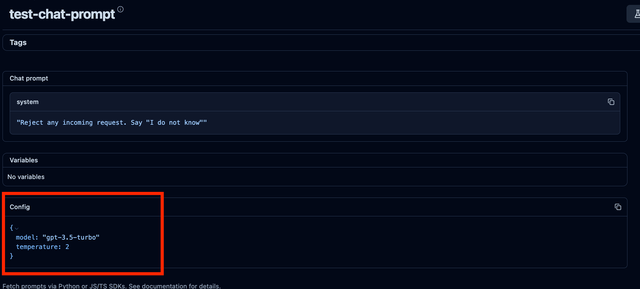
If the model is specified in the Langfuse config, it will be used.
model_list:
  - model_name: gpt-3.5-turbo
    litellm_params:
      model: azure/chatgpt-v-2
      api_key: os.environ/AZURE_API_KEY
      api_base: os.environ/AZURE_API_BASE
What is 'prompt_variables'?
prompt_variables: A dictionary of variables that will be used to replace parts of the prompt.
What is 'prompt_id'?
prompt_id: The ID of the prompt that will be used for the request.
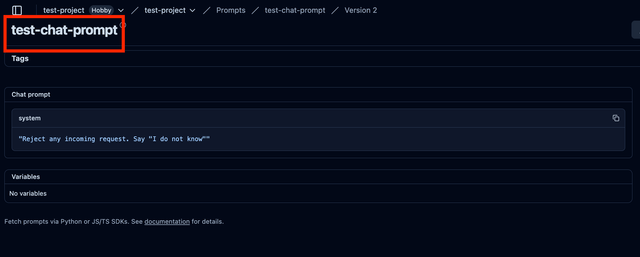
What will the formatted prompt look like?
/chat/completions messages
The messages field sent in by the client is ignored.
The Langfuse prompt will replace the messages field.
To replace parts of the prompt, use the prompt_variables field. See how prompt variables are used
If the Langfuse prompt is a string, it will be sent as a user message (not all providers support system messages).
If the Langfuse prompt is a list, it will be sent as is (Langfuse chat prompts are OpenAI compatible).
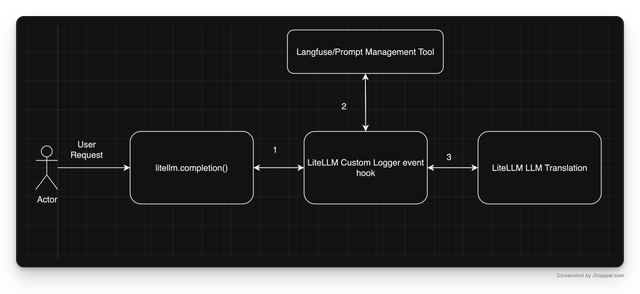
Architectural Overview
API Reference
These are the params you can pass to the litellm.completion function in SDK and litellm_params in config.yaml
prompt_id: str # required
prompt_variables: Optional[dict] # optional
prompt_version: Optional[int] # optional
langfuse_public_key: Optional[str] # optional
langfuse_secret: Optional[str] # optional
langfuse_secret_key: Optional[str] # optional
langfuse_host: Optional[str] # optional